
SvipGems Deposit Guide for Pakistani Players

Supported Payment Methods in Pakistan
SvipGems supports the most popular Pakistani payment methods. Here is a quick overview:
|
Payment Method |
Type |
|
JazzCash |
Mobile Wallet |
|
EasyPaisa |
Mobile Wallet |
|
Bank Transfer |
Online Banking |
|
SadaPay |
Digital Wallet |
|
NayaPay |
Digital Wallet |
Most Pakistani players use JazzCash and EasyPaisa as they are fast, easy, and widely available.
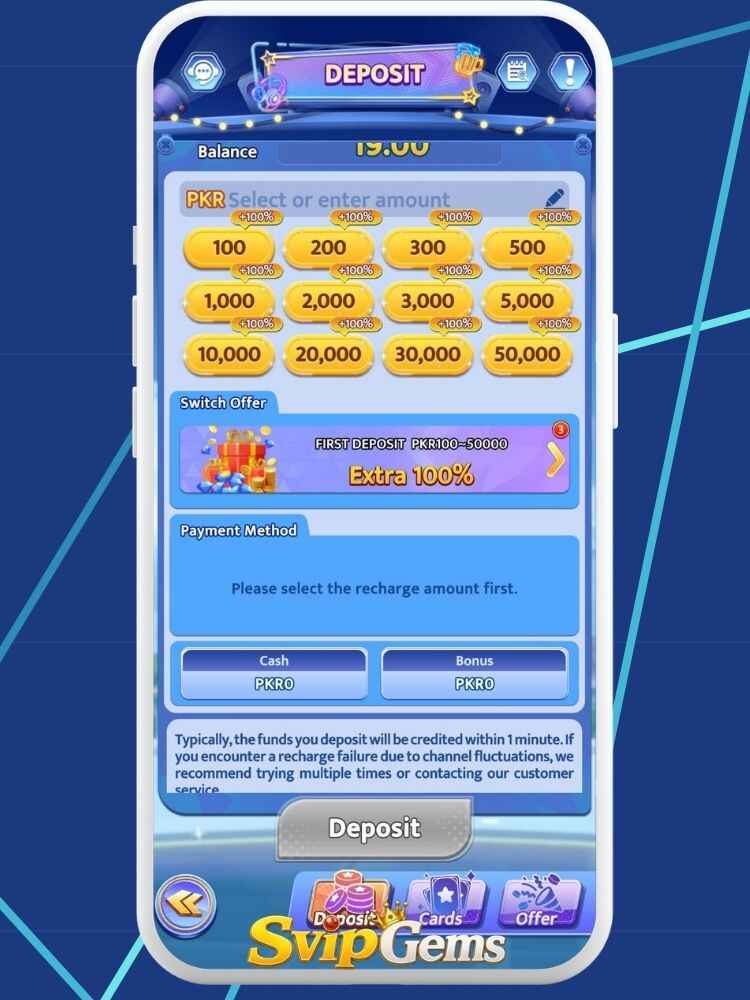
Minimum and Maximum SvipGems Deposit Limits
Before depositing, know the limits:
|
Limit Type |
Amount |
|
Minimum Deposit |
PKR 100 – PKR 200 |
|
Maximum Deposit |
PKR 50,000 (may vary) |
|
Daily Deposit Limit |
Depends on VIP level |
|
Processing Time |
Instant to 5 minutes |
Higher VIP levels may have increased deposit limits and faster processing times.
How to Deposit via JazzCash?
JazzCash is the most popular deposit method among Pakistani players. Follow these steps:
How to Deposit via EasyPaisa?
The process for EasyPaisa is almost the same:
|
Step |
Action |
|
Step 1 |
Log in and go to the Deposit section |
|
Step 2 |
Select EasyPaisa as payment method |
|
Step 3 |
Enter the deposit amount |
|
Step 4 |
Note the EasyPaisa account number shown on screen |
|
Step 5 |
Open your EasyPaisa app or dial *786# |
|
Step 6 |
Send the exact amount to the given number |
|
Step 7 |
Copy the transaction reference number |
|
Step 8 |
Paste it in the SvipGems form and tap Submit |
Important: Always send the exact amount shown. Sending a different amount may cause delays or rejection.
How to Deposit via Bank Transfer?
For users who prefer online banking, here is how it works:
Tip: Bank transfers may take slightly longer, up to 15 to 30 minutes during busy hours.
SvipGems Deposit Bonuses You Can Claim
Every deposit can unlock a bonus. Here is what Pakistani players can expect:
| Bonus Type | Details |
| First Deposit Bonus | Extra percentage added on your very first top-up |
| 7-Day Top-Up Bonus | Reward for depositing 7 days in a row |
| Deposit Spinner | Free spin after each deposit |
| VIP Deposit Bonus | Higher bonuses for higher VIP levels |
| Festival Bonus | Special top-up rewards during Eid, Independence Day |
Always read the bonus terms and conditions before claiming. Most bonuses have a wagering requirement before withdrawal.
Things to Do Before Making a Deposit
Follow this checklist before you send any money:
Common SvipGems Deposit Problems and Fixes
|
Problem |
Fix |
|
Deposit not showing in balance |
Wait 10 minutes; if still missing, contact customer support with your transaction ID |
|
Wrong amount sent |
Contact support immediately with proof of payment |
|
Transaction ID not accepted |
Make sure you copied the full ID without spaces |
|
Deposit option not loading |
Clear app cache and restart the app |
|
Payment sent to wrong number |
Contact Svip Gems support and your payment provider immediately |
|
Deposit rejected |
Check if your account is fully verified and try again |
How Long Does a Deposit Take?
|
Payment Method |
Processing Time |
|
JazzCash |
1 – 5 minutes |
|
EasyPaisa |
1 – 5 minutes |
|
Bank Transfer |
10 – 30 minutes |
|
SadaPay / NayaPay |
5 – 15 minutes |
If your deposit takes longer than the times above, contact 24/7 customer support inside the app.
Is It Safe to Deposit on SvipGems?
This is a fair question. Here is an honest and neutral answer:
|
Factor |
Reality |
|
Payment via JazzCash/EasyPaisa |
Transactions are handled by regulated platforms |
|
No official regulation |
SvipGems itself is not a licensed financial platform |
|
User reports |
Some users report smooth deposits; others face delays |
|
Risk level |
Moderate, always start with a small deposit |
Advice: Never deposit large amounts right away. Start small, test the process, and only increase once you are comfortable.
SvipGems Deposit Conclusion
Depositing on SvipGems is straightforward for Pakistani players. With support for JazzCash, EasyPaisa, and bank transfers, most users can top up their account within minutes.
Always keep your transaction ID, send the exact amount, and start with small deposits. If anything goes wrong, the in-app customer support team is available around the clock.
Play responsibly and only deposit what you can afford to spend.
FAQs
What is the minimum deposit on SvipGems?
The minimum deposit is approximately PKR 100 to PKR 200, though this may vary depending on the payment method.
Can I deposit using a friend’s JazzCash account?
It is strongly recommended to use only your own registered wallet to avoid account verification issues.
How long does a JazzCash deposit take?
A JazzCash deposit is usually reflected in your SvipGems balance within 1 to 5 minutes.
What should I do if my deposit is not showing?
Wait up to 10 minutes, then contact customer support with your transaction ID and payment screenshot.
Can I cancel a deposit after sending money?
No, once the money is sent via JazzCash or EasyPaisa, it cannot be cancelled. Contact support if there is an issue.
Do I get a bonus on every deposit?
Not always, bonuses depend on the active promotions at the time of your deposit and your current VIP level.